
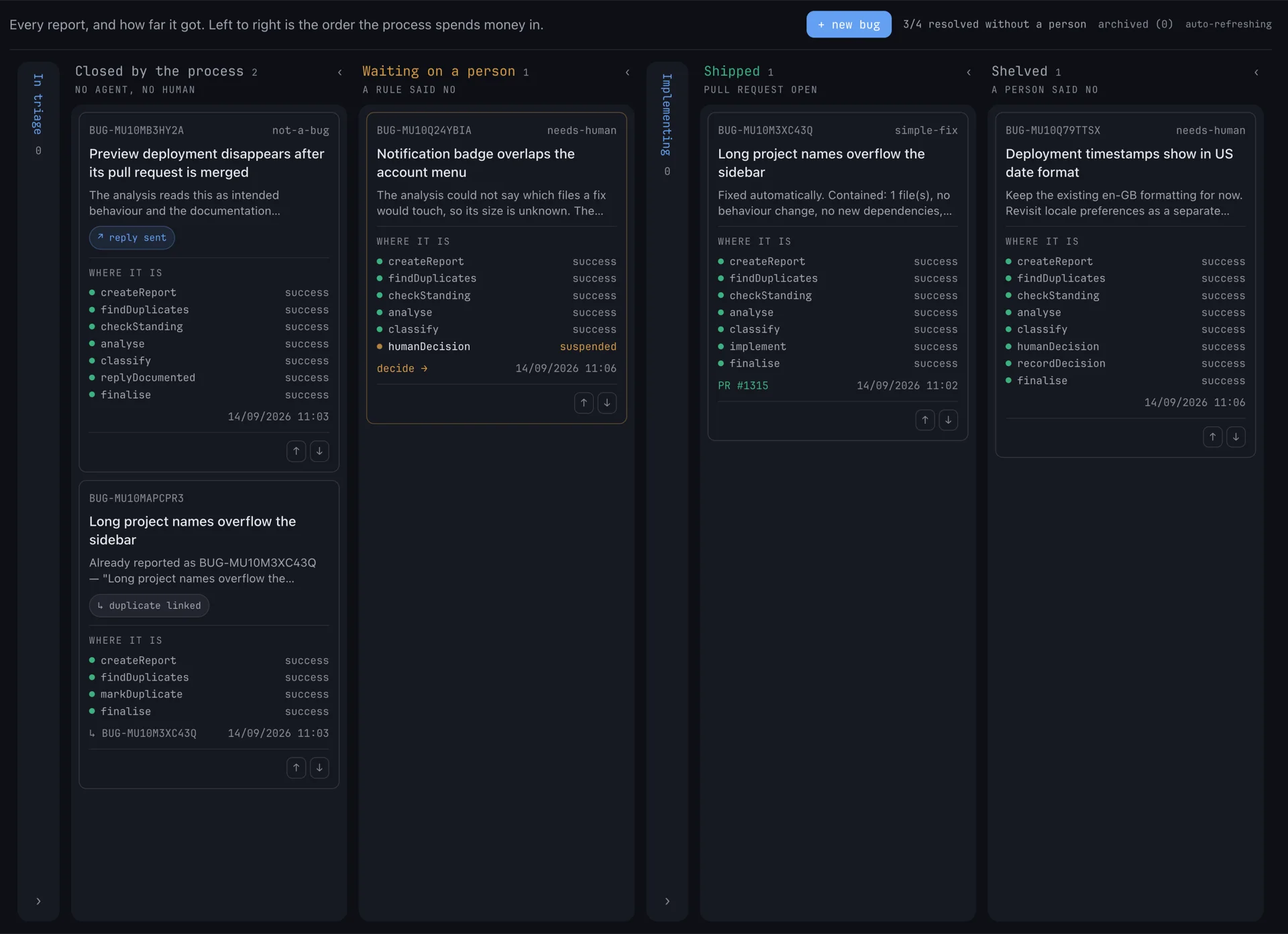
A bug triage process that runs on agents and stops before it does something nobody approved. Mastra workflows on Bun, a TanStack Start web app and Mastra Studio, managed as a single Turborepo monorepo. Rock8Cloud provisions the database and wires the services, so the first report can be filed minutes after deploy.
Or ask an agent instead of clicking. With Rock8Cloud connected over MCP, deploy_blueprint with the bugtriage slug forks the same template into your GitHub account, creates the project with its services, and starts the first build.
Deploy in one click#
The blueprint clones the monorepo into your GitHub account, then builds three services from it - the Mastra server (port 4111), the web app (port 3000) and Mastra Studio (port 3001). A managed PostgreSQL database with pgvector is provisioned and passed to the server as DATABASE_URL.
The web app reaches the server over the internal network. Studio runs in the browser, so it gets the server public URL, and the server allows Studio’s origin for CORS. Nothing about that is yours to wire.
How a report moves#
Every stage costs more than the one before it, and each stage exists to stop work reaching the next:
- Duplicates - one embedding against past reports. A match is linked and closed.
- Standing rules - a policy agent recalls rules your team taught it and closes reports they cover.
- Analysis - a read-only Rock8Cloud agent reads your repository and the product docs.
- Policy - a plain rule sends the report to one of three branches: not a bug, simple fix, or needs a person.
A simple fix goes to a coding agent that implements it and opens a pull request. Anything else suspends the workflow with a drafted brief, and a person approves, backlogs or declines it from the review page.
What is in the box#
| Layer | Technology |
|---|---|
| Agents | Mastra workflows, Memory and evals, port 4111 |
| Web | TanStack Start, port 3000 |
| Studio | Mastra Studio, port 3001 |
| Models | Any model on rock8router, one OpenAI-compatible key |
| Coding agents | Rock8Cloud agent sessions over the REST API |
| Database | PostgreSQL with pgvector |
Before the first report#
Set three values on the server service, then redeploy it:
GATEWAY_API_KEY- anr8_token for rock8router, the model gateway the app reasons withROCK8CLOUD_API_KEY- avhk_Rock8Cloud API key, used to start the coding agentsROCK8CLOUD_SERVICE_ID- the repo-backed service the agents read and change
Then open the web app, go to Setup and run the docs index once. It loads the product documentation into pgvector so the analysis can tell intended behaviour from a bug. The same page shows whether each key actually works.
Pro tip: The server, the web app and Studio have no authentication. Anyone with the server URL can start workflows that spend your gateway budget and task coding agents with your key. Treat the URLs as private and add auth before putting anything real behind them.
Tuning the policy#
The decision is a pure function in apps/server/src/mastra/classify.ts. Its thresholds - DUPLICATE_THRESHOLD, MAX_AUTOFIX_FILES, ANALYSIS_CONFIDENCE_FLOOR and DOCS_INTENT_THRESHOLD - are env vars on the server service. Change one, file the same report again, and watch the branch flip.
Deciding from Slack#
Set SLACK_BOT_TOKEN, SLACK_SIGNING_SECRET and SLACK_CHANNEL_ID on the server service and every report opens a thread. Reports waiting on a person get Build, Backlog and Won’t do buttons, and the button calls the same decision as the review page.