
Grok Bot does the work, Rock8Cloud gives it a starting stack and real hosting, in the EU. One message connects them, and from then on your bot can ship and run apps for you.
What you need#
- Grok Bot access on your xAI account (it is in beta).
- A GitHub account. You sign in with it during setup, which creates your Rock8Cloud account if you don’t have one yet.
Connect the Rock8Cloud MCP to Grok Bot#
-
Ask the bot to add the server. Send this in a Grok Bot chat:
Add an MCP server for rock8cloud https://app.rock8.cloud/mcp
One message adds the server -
Confirm and sign in. The bot asks Add rock8cloud to me now? Pick Yes, add it, then click Continue on the rock8cloud card. Rock8Cloud opens in a popup and walks you through Sign in with GitHub, Connect GitHub (you can skip it for now) and Allow access. Open Customize to turn permissions off before you click Allow. No API key, no secret in the chat.
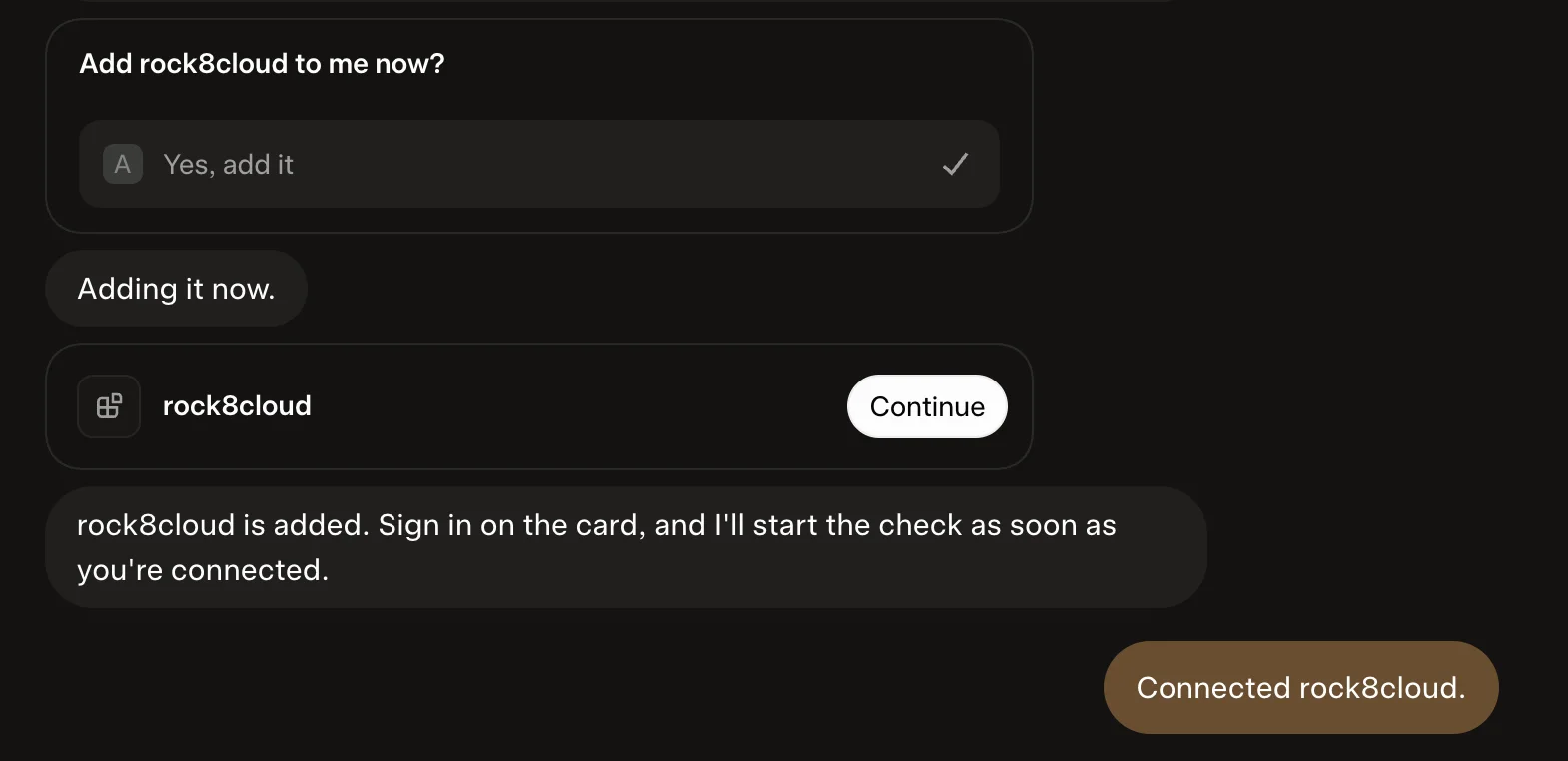
Yes, add it, then Continue to sign in 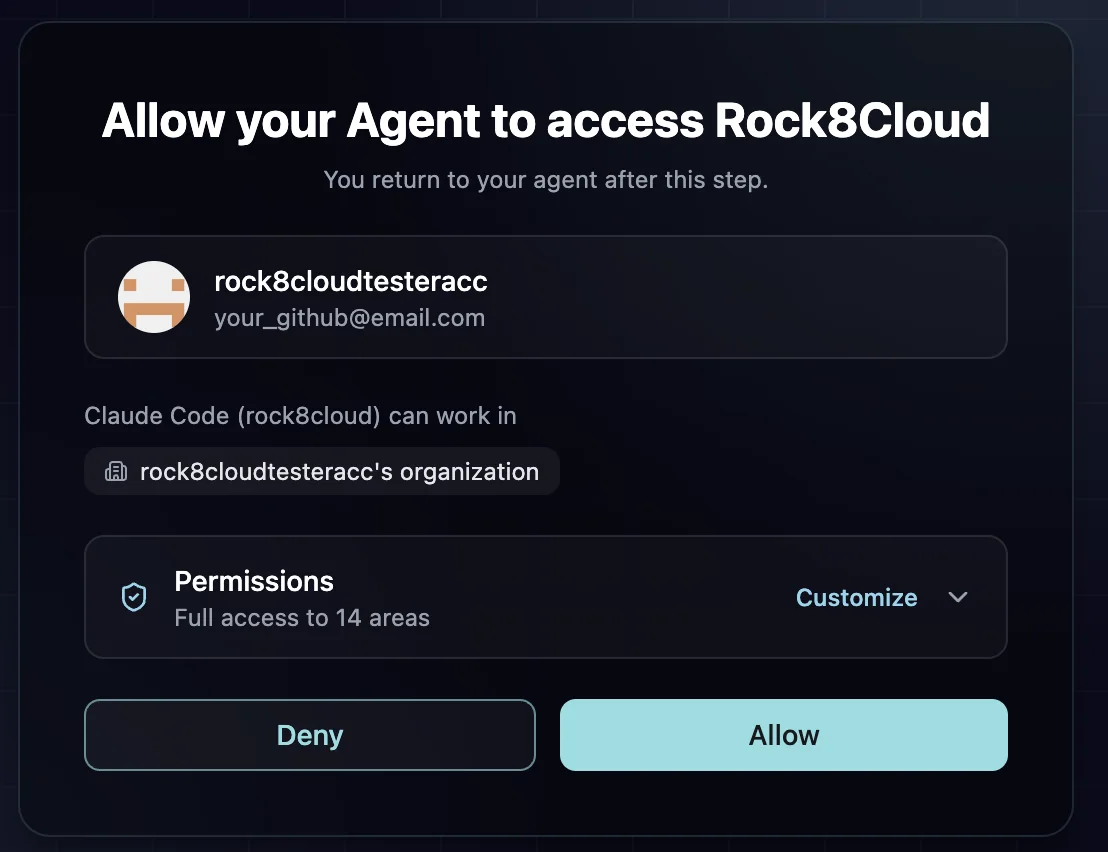
Approve the access -
Check it. Once the chat shows Connected rock8cloud, ask Grok Bot what is running in one of your organizations.
Grok Bot and Grok on grok.com are separate connections. Adding Rock8Cloud to one does not add it to the other.
You decide what Grok Bot may do#
Grok Bot asks for your approval before it runs a Rock8Cloud tool, so nothing changes without your say. Reading logs and status is safe to approve as it comes. Deploys, environment variable writes and published pages each wait for you. Tools that delete or overwrite something are marked as destructive, and deleting a project or a service needs an explicit confirmation on top. The Customize step during sign-in limits what the bot can reach at all, for example read-only access to deployments.
What you can do with it#
Every tool, with example prompts, is on the MCP primitives page. Some ideas to start with:
Build a proper prototype from a verified blueprint
Start from a verified repository with a local stack, spend tokens on your idea instead of scaffolding, and get a live URL from the first deploy.
Prototype a team dashboard from a blueprint
Ship your repo with its database
Build, database, env vars and a live URL in one step. Every push redeploys, and your own domain is one more prompt.
Deploy my GitHub repo on Rock8Cloud with a Postgres database
Hand a task to a cloud agent
An agent works in its own sandbox with its own copy of the repo and comes back with a pull request and a preview.
Have an agent fix the flaky checkout test
Find out why a deploy failed
Build and runtime logs read straight into the chat, so the fix starts from the evidence, not a guess.
Why did the last deploy of the API fail?
Add a database, cache or storage
PostgreSQL, Dragonfly (Redis) or S3 storage, linked into your service as env vars.
Add Redis to the API and link it
Share your work as a page
Reports, previews and summaries get their own rock8cloud.page link, public or password-protected.
Publish this report as a page for the team
Check what is running
Every service with its uptime, plus CPU and memory usage against the limits.
What is running in production, and is anything close to its limits?
Catch problems before they ship
Critical dependency vulnerabilities and code review findings, with the fix to apply.
Any critical vulnerabilities in my services?
Why give your bot Rock8Cloud#
A bot that ships, not just suggests#
With Rock8Cloud connected, Grok Bot goes past writing code to running it. Ask for a prototype and it starts from a verified blueprint: the stack is forked into your GitHub account with its database, deployed and back with a live URL. You own the code, and every push redeploys.
Debugging that starts from the evidence#
When a deploy fails, the bot reads the real build and runtime logs instead of guessing. It sees every service with its state, uptime and resource usage, so “is anything broken?” gets an answer from the platform, not from memory.
Work that runs while you are away#
Grok Bot can hand a task to a Rock8Cloud cloud agent. The agent works in its own sandbox with its own copy of the repo and comes back with a pull request and a preview to review. Results the bot writes up, a report or a changelog, can go live as a page with its own link.
Hosted in the EU#
Your services, databases and pages run in EU data centers, and the MCP server Grok Bot talks to runs on the same platform. Rock8Cloud is built in Czechia.
Good to know: deploys come from GitHub. Connect it during the sign-in, or the bot gives you a link when a deploy needs it. Push before you deploy. Anything billed is confirmed with you first.
Troubleshooting#
The sign-in popup does not open. Click Continue on the rock8cloud card. If nothing opens, allow popups for Grok Bot and click it again.
The tools stopped working after a long break. Ask Grok Bot to reconnect the rock8cloud server and finish the sign-in again for fresh tokens.
The answer is about the wrong organization. Name the organization in the question.
Next: control Rock8Cloud from Grok · control Rock8Cloud from Claude · control Rock8Cloud from ChatGPT and Codex.